Using CLARK AI · 5 min read

How to report a pothole in City of Los Angeles in about eight seconds with CLARK AI

Open CLARK AI, point your iPhone at the pothole, press and hold, and say what you see. That's the whole job. CLARK AI (Civic Liaison for Action, Reporting & Knowledge) is the civic assistant from Tea For Streets. Reporting is free. It identifies the pothole, measures it with your iPhone's LiDAR, writes the report, files it into MyLA311 after a human checks it, then shows you what the City of Los Angeles does with it: Received, On It, Resolved.

What you'll need

  • An iPhone running iOS 17.6 or later. A Pro model with LiDAR gets you true depth measurements; other iPhones still work and show estimates.
  • CLARK AI by Tea For Streets, free on the App Store. Sign in with Apple takes one tap.
  • Camera and location access while you're using the app. CLARK AI uses your location to place the pothole on the map.
  • A location inside the City of Los Angeles, if you want the report filed for you automatically. Anywhere else, CLARK AI's Scout Mode prepares the report and points you to the right local 311.
  • A safe place to stand. Report from the curb or sidewalk, never from the traffic lane.

Step-by-step: reporting the pothole
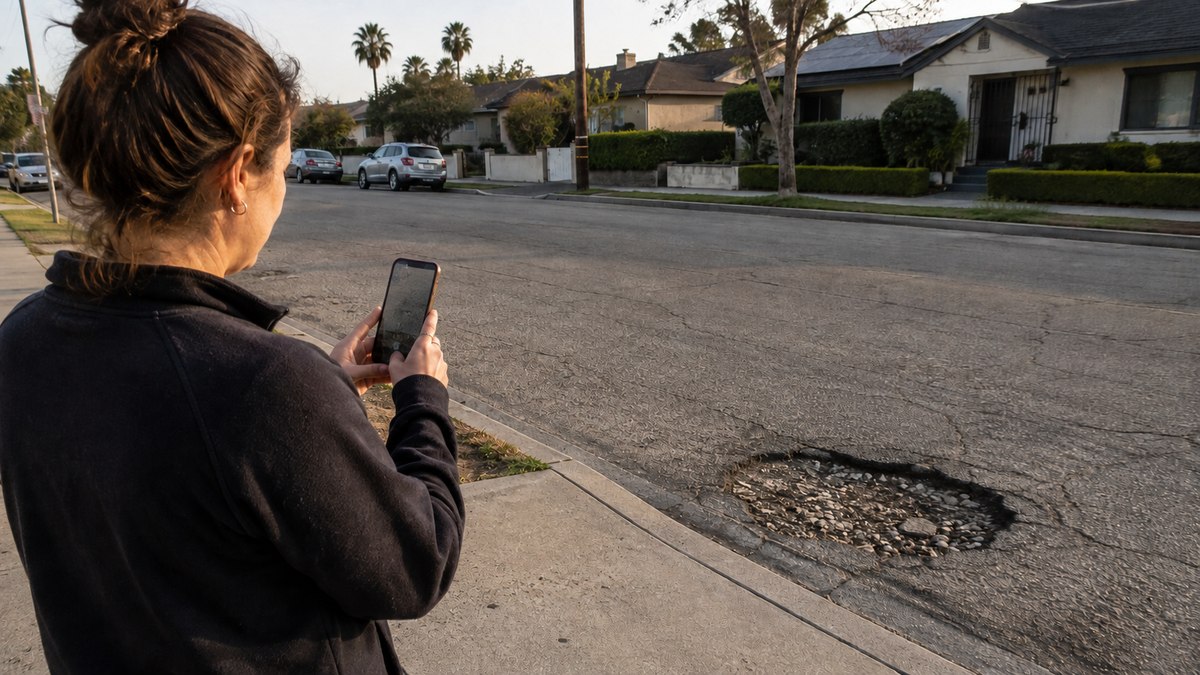
A person standing on the curb of a Los Angeles residential street, pointing an iPhone camera at a pothole in the road
  1. Start from Siri or from the app. Say "Hey Siri, tell Clark AI to report a pothole," and the app opens straight to the camera. Or open CLARK AI and tap the gold orb. Either way, you skip every menu.
  2. Point the camera at the pothole. Stand a few feet back so the whole hole and a bit of the surrounding asphalt are in frame. Daylight helps; a streetlight is usually enough at night. On a LiDAR iPhone, keep the phone reasonably steady for a moment so it can read the depth.
  3. Press and hold, and say what you see. "There's a pothole in the right lane in front of 4th and Main." Plain language is exactly right. You don't need a department name, a request category, or a form field, and you don't need to spell the address.
  4. Confirm the freeze-frame. CLARK AI frames what it found and asks something like "I saw a pothole. Should I submit this?" If it framed the wrong thing, retake. If it's right, confirm, and CLARK AI sends it automatically.
  5. Watch the tracker. Your report gets a Tea For Streets ID and a status line: Received, then On It when the city has opened a work order or is actively handling it, then Resolved when the city reports a terminal outcome. You'll also collect Street Cred, with a bonus for potholes.

From "Hey Siri" to "Sent" is about eight seconds. All the work a 311 form normally pushes onto you is done by the app, then checked by a person before anything reaches the city.

What happens after you send it

Every report passes a human review before it is filed. A person at Tea For Streets looks at the photo, the measurement, and the location, and confirms the pothole is real and on a public road. No unreviewed AI output reaches a city system.

The report is then filed into MyLA311, the city's request system, where potholes route to StreetsLA (the Bureau of Street Services). StreetsLA's documented service level for potholes is three business days, and the City Controller found that 92% of 19,252 pothole requests in one audited year were closed within that window. CLARK AI checks the case as the city updates it and moves your status line accordingly.

Two things worth knowing. First, the filing is anonymous to the city: it carries the issue, the location, and the photo, not your name or email. Second, "Resolved" means the city reported a terminal outcome: closed, cancelled, duplicate, or referred, not necessarily that a crew has been out with a truck.

Field notes · Tea For Streets

Spill the Tea

Potholes are the most common issue type filed through CLARK AI. As of September 2, 2026, they were 40 of the 83 cases filed into MyLA311, nearly half of everything, with reports coming in from across the city. Of those 40, 80% reached a city-reported terminal outcome, and the median time from filing to city closure was five days. Slower than the three-business-day service level on paper, and faster than most people expect from LA.

A photo alone often undersells a pothole. It can look flat on a screen and still be the kind you feel in the tire. That's why CLARK AI measures on LiDAR iPhones: depth, area, and volume, so the city gets a work order, not a complaint.

A common reason a report doesn't move has nothing to do with the pothole itself: it's on a state route. Stretches of Lincoln Boulevard, Pacific Coast Highway, and Sepulveda near the freeways belong to Caltrans, not the City, and MyLA311 can't act on those. CLARK AI doesn't check jurisdiction yet, so it's worth a second look before you file one on those corridors.

And one honest limit: our numbers come from a pilot-scale sample our own field team generated much of, not mass adoption. We publish them because outcomes are the point, and we'll keep updating them as the sample grows.

FAQ

Do I need to know the address of the pothole?

+
No. CLARK AI uses your iPhone's location while you're reporting, places the pothole on the map, and shows you the address it will file. If you're standing across the street, that's close enough for a crew to find it.

Can I report a pothole at night?

+
Yes. The camera needs enough light to see the hole, so a streetlight or headlights usually do it. If the freeze-frame doesn't clearly show the pothole, retake it or come back in daylight.

Is my pothole report anonymous?

+
To the city, yes. The filing carries the issue type, location, and photo. Your name and email stay with your Tea For Streets account and are never part of what the city receives.

How many reports can I file in a day?

+
Ten. The cap keeps the signal clean for the city and keeps Street Cred honest.

What if the pothole is on a freeway or a state highway?

+
CLARK AI doesn't check who owns the road yet. Freeways and state routes generally belong to Caltrans, not the City of Los Angeles, so a report on one of those may not be actionable through MyLA311. Report it anyway: it still goes through the same human review as every other case.

Does this work outside the City of Los Angeles?

+
Filing on your behalf works only inside the City of LA today. Elsewhere, Scout Mode prepares a downloadable report with your local agency's phone and website so you can send it yourself.

We post case timelines, city outcomes, and the occasional before-and-after as they happen, without editorializing.

Follow on LinkedIn
CLARK AI by Tea For Streets
Report what you see.
Free to report, right from your iPhone.
Download on the App Store